Overview

Webhooks on Mayar allow businesses to receive instant notifications about important events, such as payment transactions or membership status changes, directly into their systems. Once enabled, key data is automatically sent to a specified URL whenever an event occurs, enabling quick and efficient responses without manual checks. This feature supports seamless integration with other applications, keeping your business informed and responsive to customer needs while improving operational efficiency and data management.

About Webhook

Webhook provide a way for notifications to be delivered to an external web server whenever certain event occur in Mayar. Gambar HD7 Pn

Add a New Webhook

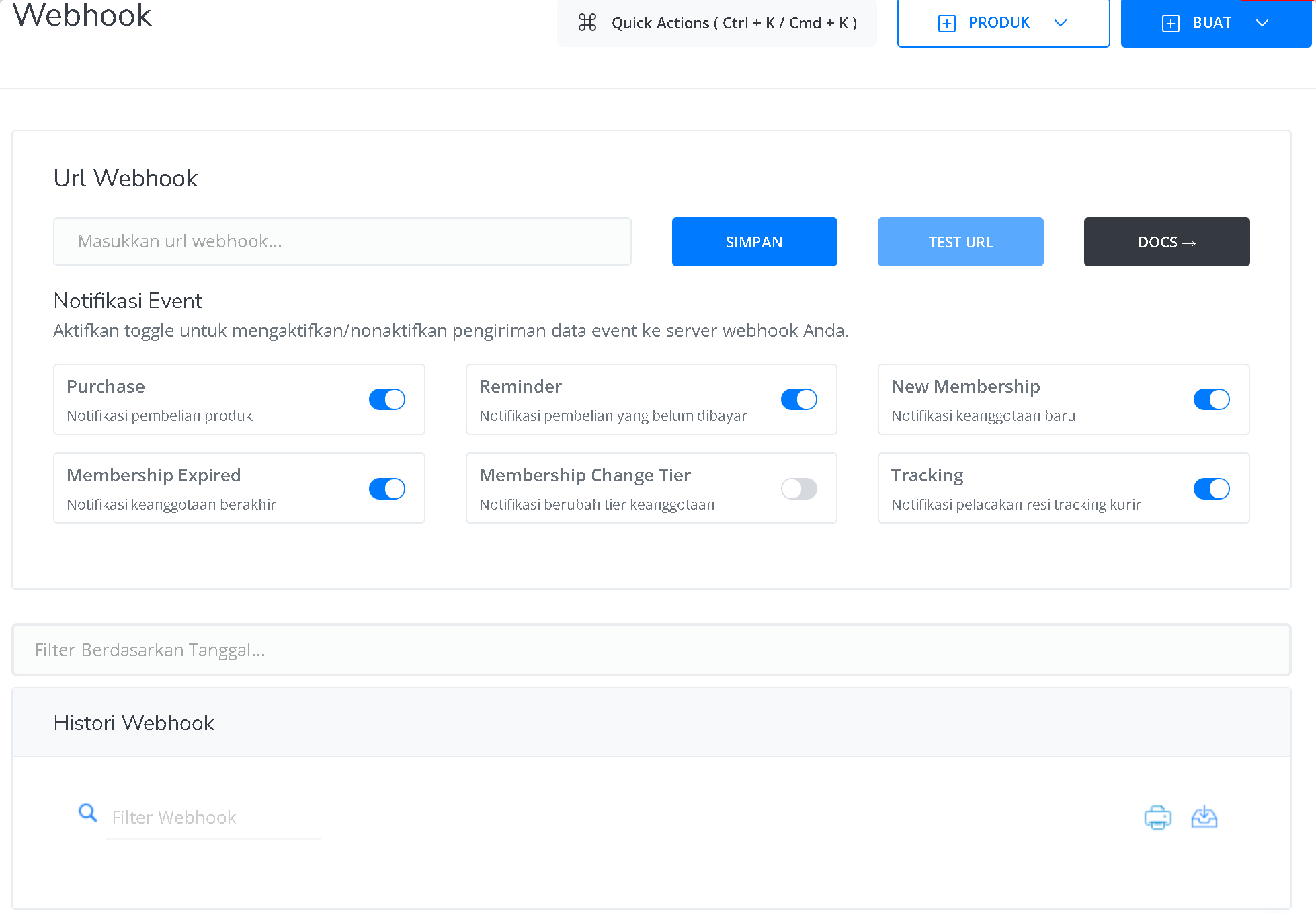
You can configure Webhooks via the Mayar dashboard, here are the steps:
  1. For starting using Mayar Webhook, you need account at https://mayar.id. Please use https://web.mayar.club for testing
  2. Go to Integration -> Webhook page
  3. In the “URL Webhook” field, input the URL you got from a third-party integration platform (such as pipedream, zapier, or others) to trigger and send the webhook event
  4. Click save then test the URL to see the status of the Webhook URL.

Request Method

The format prepared by the engine is ​JSON​. with Method use POST and application/json for Content-type

Event Type

Message event webhooks can be triggered by several types of events:

Parameter Description

Each type of webhook sends a slightly different payload data.